
Open SSO Advanced Configuration
 aalfiann
included in Documentation
aalfiann
included in DocumentationOpen SSO is having a lot of feature, let’s learn about Open SSO configuration more detail here.
Table Of Contents
- 1. JWT
- 2. Database
- 3. Cache
- 4. Domain
- 5. Website
- 6. Prevent BOT and SPAM
- 7. Mailer
- 8. Template
- 9. Static Cache
- 10. Sign with Google
- 11. Sign with Apple
Learn more
Configuration
Application will read file config.js for the configuration. But there is a config.default.js where is the default configuration which is you can use it for backup in case you broke the current configuration.
Here is the full example default configuration file.
const config = {
  // CORE
  host: '0.0.0.0', // Host Server (default is 0.0.0.0)
  port: 3000, // Port Server (default is 3000)
  logger: true, // Server Log (default is true)
  useWorker: false, // Use CPU as worker. Please don't use this if you're at shared hosting. (default is false)
  maxParamLength: 100, // Maximum url parameter query length (default is 100 characters)
  jwtAlgorithm: 'RS256',
  jwtExpiresIn: '8h', // 8 hours to expire
  sequelizeOption: {
    // dialect: 'mariadb', /* one of 'mysql' | 'mariadb' | 'postgres' | 'mssql' */
    // dbname: 'DATABASE_NAME',
    // username: 'DATABASE_USER_NAME',
    // password: 'DATABASE_USER_PASSWORD',
    // options: {
    //   host: 'DATABASE_HOST_OR_SERVER',
    //   port: 'DATABASE_PORT'
    // }
    dialect: 'sqlite',
    storage: './database/data.sqlite3'
  },

  // =========================================

  // CACHE TTL
  // configuration ttl cache is here (in second)
  // zero means manual release cache (no auto release)
  cache: {
    engine: 'memory', // You are able to set engine for redis, file or memory. (default is memory)
    redisConn: 'redis://localhost:6379', // This is redis connection string, only work if the engine is redis. Default is redis://localhost:6379
    ttl: {
      master_data: 3600,
      public_profile: 3600, // cache will auto release in 1 hour.
      total_user_month: 3600,
      total_user_year: 3600,
      total_user_active: 3600,
      total_user_inactive: 3600,
      total_user_list: 3600,
      menu_parent_list: 3600,
      menu_parent_group_list: 3600,
      menu_parent_role_list: 3600,
      menu_parent_role_list_grouped: 3600
    }
  },

  // =========================================

  // WEBSITE
  // This is the base url, used for template engine
  // Change with your domain without trailing slash.
  // Example : https://yourdomain.com
  baseUrl: 'http://localhost:3000',
  baseAssetsUrl: 'http://localhost:3000',
  siteName: 'Open SSO',
  siteTitle: 'An Open Single Sign On to make easier sign-in to all of your applications.',
  siteDescription: 'An Open Single Sign On to make easier sign-in to all of your applications.',
  authorName: 'M ABD AZIZ ALFIAN',
  authorWebsite: 'https://linktr.ee/aalfiann',
  authorEmail: 'aalfiann@gmail.com',
  startYearCopyright: 2022,
  webmaster: { // Just leave blank if you don't want to use this
    google: '', // Get the verification id at >> https://www.google.com/webmasters
    bing: '', // Get the verification id at >> https://www.bing.com/toolbox/webmaster
    yandex: '' // Get the verification id at >> https://webmaster.yandex.com
  },
  tracker: {
    googleAnalyticsID: '' // Get GA tracker id at >> https://analytics.google.com
  },
  social: [
    { name: 'twitter', link: 'https://twitter.com/aalfiann' },
    { name: 'github', link: 'https://github.com/aalfiann' },
    { name: 'gitlab', link: 'https://gitlab.com/aalfiann' }
  ],

  // User Activation by Email
  useActivationUser: false,

  // Mailer
  // useMailer will affect on contact form page
  useMailer: true,
  // All mails will send to this email address
  // Note:
  // - This email address should be different with email address for transport
  // - You are able to use any email service like gmail, yahoo, etc for your inbox.
  recipientEmailAddress: 'your_inbox_mail@gmail.com',
  // nodeMailerTransport config.
  // For more detail configuration, please see >> https://nodemailer.com
  // Using smtp gmail will be need oauth2, it's hard to config, so I do recommend to setup no_reply email from your cpanel.
  // I recommend to use Zoho Mail, because it's very easy.
  nodeMailerTransport: {
    pool: true,
    host: 'smtp.zoho.com',
    port: 465,
    secure: true, // secure:true for port 465, secure:false for port 587
    auth: {
      user: 'your_noreply_mail@zohomail.com',
      pass: 'xxxxxxx'
    }
  },

  // Template Engine Configuration
  // Set directory of your template
  templateDir: 'default',
  // When you set isProduction to true, then template engine will heavily cache the response.
  // Mode production speed is much faster but you need to restart the app if you have modified the template. (default is false)
  isProduction: false,
  // When you set isProduction to true:
  // 1. Html page source will be minified.
  // 2. Database logging is false
  //
  // Note:
  // - Javascript inline in html will not be minified.
  // - Not all shared hosting will work.
  useHTMLMinifier: false,
  // Options for html minifier (this will work if you set useHTMLMinifier to true)
  // For more detail, see https://github.com/terser/html-minifier-terser#options-quick-reference
  minifierOptions: {
    removeComments: true,
    removeCommentsFromCDATA: true,
    collapseWhitespace: true,
    collapseBooleanAttributes: true,
    removeAttributeQuotes: true,
    removeEmptyAttributes: true,
    minifyJS: true,
    minifyCSS: true,
    removeScriptTypeAttributes: true,
    removeStyleLinkTypeAttributes: true,
    removeOptionalTags: true,
    removeRedundantAttributes: true
  },
  // this autoEtag will work if isProduction set to true.
  autoEtagAfterHour: 12, // This will generate etag for every 12hours in a day. (max 24)

  // Static Cache
  maxAgeStaticCache: (3600 * 24), // cache for regular static pages (default is 1 day in seconds)
  maxAgeAssetsCache: (3600 * 24 * 30), // cache for assets ( default is 30 days in seconds)

  // Anti Spam Google reCaptcha v3
  // Register at here >> https://www.google.com/recaptcha
  // Just leave this blank if you don't want to use Google reCaptcha v3
  recaptchaSiteKey: '',
  recaptchaSecretKey: '',
  hideRecaptchaBadge: true,

  // Oauth
  oauth: {
    access_key: 'd2VsY29tZSB0byBvcGVuIHNzbw==', // you can set your direct access_key to allow request_token for internal use.
    google: {
      enable: false,
      client_id: 'XXXX.apps.googleusercontent.com',
      client_secret: 'XXXXX-XXXXX-XXXXX-XXXXX'
    }
  }
}
1. JWT
Open SSO use JWT for whole authentication. You have to generate new private.key and public.key, the easy way is you can grab it from https://jwt.io. Make sure the algorithm is same.
a. Config JWT
Default JWT configuration is
jwtAlgorithm: 'RS256',
jwtExpiresIn: '8h', // 8 hours to expire
Note:
- It’s better for you to use minimum 8 hours. Because we don’t have a refresh token. When the token expired, they need to relogin.
b. Generate New private.key and public.key
When you are in micro services, you have to use same private.key and public.key, so the token will verified in all nodes.
To generate new private.key and public.key,
- Run this command below in your terminal
cd /path/app
chmod +x rs256jwt.sh
./rs256jwt.sh
- Done, the old
private.keyandpublic.keyfile will be replaced automatically.
2. Database
Open SSO support multiple databases. The default is using SQLite3.
Here is the example database configuration:
a. SQLite3
sequelizeOption: {
  dialect: 'sqlite',
  storage: './database/data.sqlite3'
},
b. RDBMS
sequelizeOption: {
  dialect: 'mariadb', /* one of 'mysql' | 'mariadb' | 'postgres' | 'mssql' */
  dbname: 'DATABASE_NAME',
  username: 'DATABASE_USER_NAME',
  password: 'DATABASE_USER_PASSWORD',
  options: {
    host: 'DATABASE_HOST_OR_SERVER',
    port: 'DATABASE_PORT'
  }
},
Note:
- If you are using RDBMS, you have to restore the database.
3. Cache
Open SSO support to using multiple kind of cache engine. You can use memory, file and redis. But the default is using memory which is not working when application in cluster or in microservices. Our recomendations is using redis for best performance, scalable and works in all environment.
Here is the example configuration:
a. Redis
engine: 'redis',
redisConn: 'redis://localhost:6379', // This is redis connection string, only work if the engine is redis. Default is redis://localhost:6379
b. Memory
engine: 'memory',
redisConn: '',
c. File
engine: 'file',
redisConn: '',
4. Domain
You are able to change the domain, baseUrl and baseAssetsUrl must be same.
baseUrl: 'https://yourdomain.com',
baseAssetsUrl: 'https://yourdomain.com',
Note:
baseAssetsUrlrefer to public directory. You can change this to your CDN.
5. Website
You are able to change the website information.
siteName: 'Open SSO',
siteTitle: 'An Open Single Sign On to make easier sign-in to all of your applications.',
siteDescription: 'An Open Single Sign On to make easier sign-in to all of your applications.',
authorName: 'M ABD AZIZ ALFIAN',
authorWebsite: 'https://linktr.ee/aalfiann',
authorEmail: 'aalfiann@gmail.com',
startYearCopyright: 2022,
webmaster: { // Just leave blank if you don't want to use this
  google: '', // Get the verification id at >> https://www.google.com/webmasters
  bing: '', // Get the verification id at >> https://www.bing.com/toolbox/webmaster
  yandex: '' // Get the verification id at >> https://webmaster.yandex.com
},
tracker: {
  googleAnalyticsID: '' // Get GA tracker id at >> https://analytics.google.com
},
social: [
  { name: 'twitter', link: 'https://twitter.com/aalfiann' },
  { name: 'github', link: 'https://github.com/aalfiann' },
  { name: 'gitlab', link: 'https://gitlab.com/aalfiann' }
],
Note:
- This configuration only affect in template engine.
6. Prevent BOT / SPAM
Open SSO could prevent bot / spam, you have to activate this feature.
useActivationUser: true,
recaptchaSiteKey: 'xxxxxxxxxxx',
recaptchaSecretKey: 'xxxxxxxxxxx',
hideRecaptchaBadge: true,
Note:
- OpenSSO using reCaptcha v3.
- You have to get the reCaptcha
SiteKeyandSecretKeyat here.
7. Mailer
Open SSO using mailer for activate user, send message contact, forgot password, etc. So you have to activate this.
useMailer: true,
recipientEmailAddress: 'your_inbox_mail@gmail.com',
nodeMailerTransport: {
pool: true,
host: 'smtp.zoho.com',
port: 465,
secure: true, // secure:true for port 465, secure:false for port 587
auth: {
    user: 'your_noreply_mail@zohomail.com',
    pass: 'xxxxxxx'
}
},
Note:
recipientEmailAddress= message from contact us will be delivered to here.- I recommend to use Zoho Mail, because it’s very easy.
- If you need custom configuration, please see » https://nodemailer.com.
8. Template
a. Theme
There is only one default theme. If you want to change the theme, you have to edit this
templateDir: 'your_theme_dir',
I’m not promise but maybe in the future I’ll release another template.
b. Minifier
To get the best performance, Open SSO having html cache and also support compression.
isProduction: true,
useHTMLMinifier: true,
Note:
- When
isProductionset to true, HTML cache will running, this will reduce server to render the template. - When
useHTMLMinifierset to true, HTML source will be minified. Javascript inline also will be minified but not 100%.
9. Static Cache
Static cache is different with Cache. This Static cache only cache the page that rendered by template engine and file static located inside public directory.
maxAgeStaticCache: (3600 * 24),
maxAgeAssetsCache: (3600 * 24 * 30)
Note:
maxAgeStaticCache= cache for regular static pages (default is 1 day in seconds)maxAgeAssetsCache= cache for assets ( default is 30 days in seconds)- NGINX will follow this rule by default. You don’t have to create custom cache configuration for this in NGINX.
10. Sign with Google
Open SSO support Sign in with Google. You have to activate this.
oauth: {
  access_key: 'd2VsY29tZSB0byBvcGVuIHNzbw==', // you can set your direct access_key to allow request_token for internal use.
  google: {
    enable: true,
    client_id: '606754042148XXXX.apps.googleusercontent.com',
    client_secret: 'XXXXX-XXXXX-XXXXX-XXXXX'
  }
}
Note:
- You can use random string for
access_key. - You have to get the
client_idandclient_secret.
How to get the client_id and client_secret:
- Go to Google Credentials Page.
- Click Create credentials > OAuth client ID.
- Select the
Web applicationapplication type. - Name your
OAuth 2.0client and clickCreate. - Done, now you already have the
client_idandclient_secret.
11. Sign with Apple
Open SSO support Sign in with Apple. You have to activate this.
oauth: {
  google: {
    // ...
  },
  apple: {
    enable: true,
    clientId: 'com.xxx.login',
    redirectURI: 'https://yourdomain.com'
  }
}
Note:
- You have to get the
clientIdandredirectURIfrom Apple Developer. - You require to have apple developer licensed to use this feature.
How to get the clientId and redirectURI:
- Open Your developer console and find
Certificates IDs & Profiles. - Click the
plus symbolto create a newApp ID. - Once you had the
App IDnow go back to the developer console andcreate a new identifier. This time selectServices IDs. - Once your new
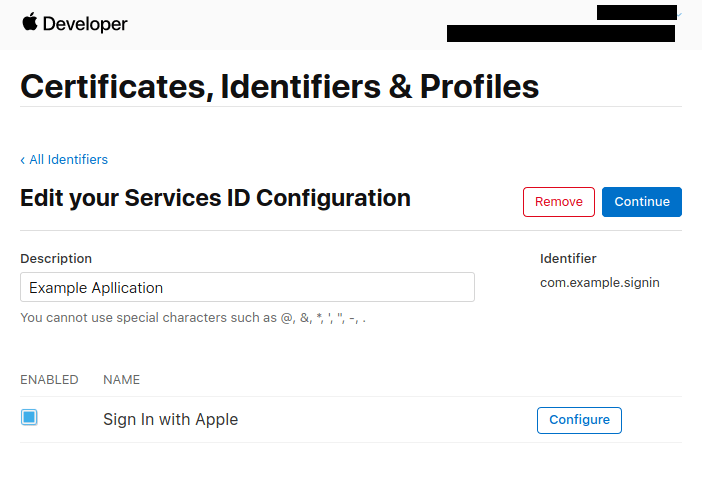
Service IDis created, find it then click on yourService IDthat you just created. - You’ll be greeted with a checkbox that say
Sign In with Apple. now click onConfigure.
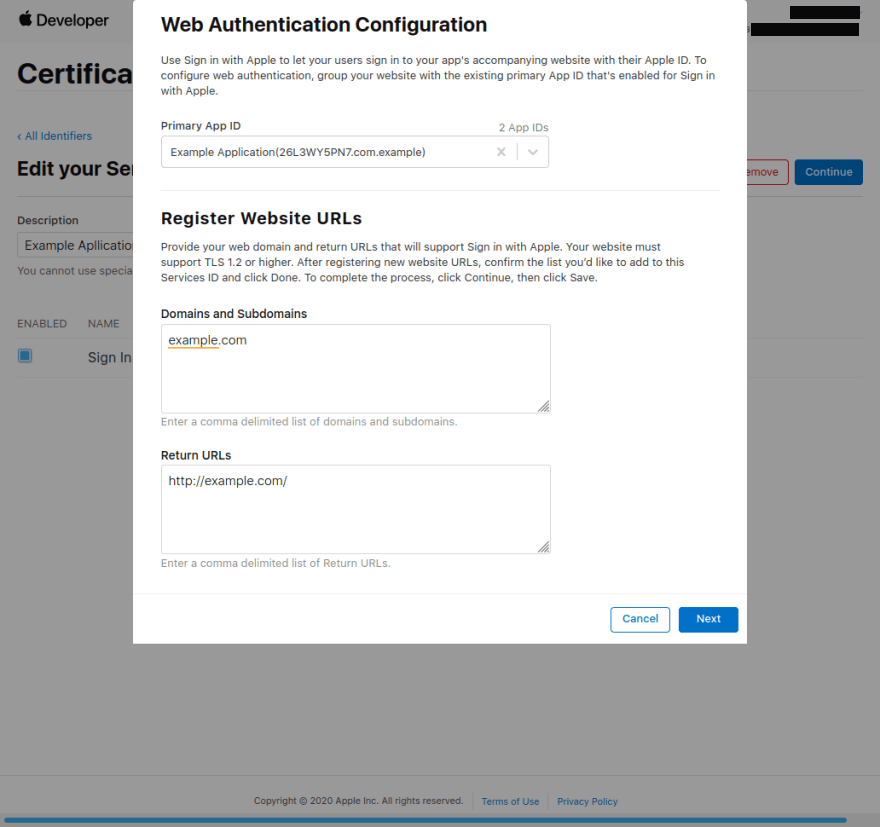
- A modal will pop up,
- As your Primary
App ID, choose the one that we just created in the previous section. - In the domains section add the domain where OpenSSO live, i.e
example.com. - The
Return URLis the location to which apple will redirect us after authentication is completed. This is also the location where apple will send the user data after authentication. Apple will send a POST request to this URL, but Open SSO using PopUp mode, so you just write it with yourdomain.com is enough. I’ve assigned http://example.com assumed that OpenSSO web is live on http://example.com.
- Click Next and Done.